Having a stylus (as a peripheral, or as part of the MacProTouch), is a good idea initially. You open a world to the user of drawing, writing, and possibly painting directly onto your computer.
Except for one small problem: pressure. Pressure is vital to all these forms of communication, because it allows for a subtly and various in pen/brush strokes that can not be replicated by a plastic supposed to be a pen.
Some styluses (?, stylusii?) use proximity to the surface to indicate pressure, but this has an unnatural feeling to the process and the user has to relearn the technique.
Nothing beats the pressure you feel as you place a pen against paper, how the paper responds to your every stroke. So the question is: should a touchscreen try and replicate this behavior?
I think it absolutely should. This for me is the key 'game-changer' of touch screens. The ability to draw/write naturally and then EDIT those sketches, is something that has never been done before.
Imagine Van Gogh painting sunflowers on the touchscreen the way he would on a canvas, furiously, naturally, the truest connection between man and canvas. Now imagine he can change each individual stroke, reuse it, animate it, delete it even. It opens up a new level of artistic expression and artistic perfection never before seen in the real world or virtual world of computing.
Imagine taking a sketch of a concept car and converting those lines to a 3d dimensional rendering which you can 'mould' in Autodesk. Gestural working a mould of clay on a 2d touchscreen connects the brain to the z axis in a new and exciting way, and ups the stakes for everyone. Now Photoshop and Autocad have entirely new software paradigms to construct.
A simple concept of pressure, can fundamentally change the software industry.
I should be able to take an actual paintbrush and use it on the MacProTouch. For every hair in the brush to be recorded, the pressure I use in the stroke, the speed. Then MacProTouch goes from entertainment system to a truly mindboggling system.
Thursday, September 24, 2009

Microsoft Courier

By now, most of you have seen Microsoft's concept touchscreen laptop at gizmodo.
There are some great, and not so great ideas in here.
First, I have to say making it look and behave like a normal notepad, just makes me realize how fantastic and enduring the notepad and pen is! But I do like the use of the pen, and I think this could be an important peripheral for MacProTouch (I will describe the design in detail)
Second, the hinge........sigh, the hinge. Basically this is a laptop, on its side, with two touchscreens.
And then there's that hinge, stealing some valuable real estate, and mercilessly cutting my large touchscreen on which I can watch a movie in wide screen, into two smaller windows.
Well I guess I could watch two movies at the same time!
But yes, not a big lover of the loss of screen size to hardware.
Also the swiping from one part of the screen to the other...........why? WHY!? OK, i get it, its supposed to be more a journal than a large drawing tablet, but still, I feel a bit cheated on that one. Surely the UI is small enough and well designed enough to collectively order my work in the appropriate way. I am not sharing a file from one screen to the other, I'm simply moving it, seems a bit pointless.
One thing I love is that the camera is at the back of the laptop, so you can take pics of what you're looking at, this is something I did not consider in the MacProTouch, but now an infinite number of possibilities opens up. Record videos of your holiday with your laptop then send them to your friends........perhaps that's too much power!
The UI is good, but i think it is a little unintuitive, in fact it seems messier than what I would actually do in a journal. (make this project my homepage? - apparently we still live in a single-tasking world where consultants only work on one project a time, heaven!)
But still, I'm amazed Microsoft is thinking this way, its great actually, and any innovation is better that none.
But, oh........that pesky hinge.
Wouldn't it be simpler to have a single screen and include a 'journal' software program that splits the screen into the Courier style design? No loss of features OR real estate!
Monday, September 7, 2009
Gestural computing
Touchscreen is one thing, but how does this experience really differ from using a tablet pen, or a mouse? It's all just point and click, whether it be by arrow, or by finger.
If you look at an Apple keyboard you'll see icons representing some commands outside of a typical interface. e.g.dashboard, or expose.
The idea is simple, rather than put these on a touchscreen keyboard, use simple dashboards to indicate what you want.
E.g. a circle pops up dashboard, a square: expose.
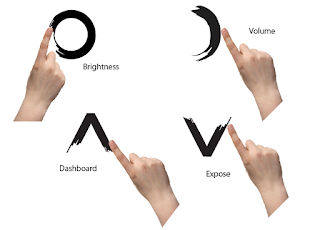
Of course this means a few problems:
Gestural commands can be easily misinterpreted. A square with soft corners, could be perceived as a circle, for example.
Gestural commands have to be quick. No drawing the sun to indicate brightness, it would take too long.
Gestural commands might be limited initially.
But the potential of this new world of gestures, changes computing from a simple display to something truly interactive. You can 'speak' to your computer with simple signals, and really its the next step of evolution in computing: binary entry, command line, point and click, signal with natural gestures.
Imagine this new wave of sign language computing, and the possibilities. Application and game developers can create custom signs for their programs, users can interact with their computer and with each other, through simple gestures. Imagine your web cam even understands simple gestures. Now you can talk to your friend online, and signal to HIS computer activities you want to do. (share a document, send a smiley face, anything!)
It elevates how people interact with computers (badly) and puts us in the drivers seat because we can teach computers gestures they can learn from.
If you look at an Apple keyboard you'll see icons representing some commands outside of a typical interface. e.g.dashboard, or expose.
The idea is simple, rather than put these on a touchscreen keyboard, use simple dashboards to indicate what you want.
E.g. a circle pops up dashboard, a square: expose.

Of course this means a few problems:
Gestural commands can be easily misinterpreted. A square with soft corners, could be perceived as a circle, for example.
Gestural commands have to be quick. No drawing the sun to indicate brightness, it would take too long.
Gestural commands might be limited initially.
But the potential of this new world of gestures, changes computing from a simple display to something truly interactive. You can 'speak' to your computer with simple signals, and really its the next step of evolution in computing: binary entry, command line, point and click, signal with natural gestures.
Imagine this new wave of sign language computing, and the possibilities. Application and game developers can create custom signs for their programs, users can interact with their computer and with each other, through simple gestures. Imagine your web cam even understands simple gestures. Now you can talk to your friend online, and signal to HIS computer activities you want to do. (share a document, send a smiley face, anything!)
It elevates how people interact with computers (badly) and puts us in the drivers seat because we can teach computers gestures they can learn from.
Thursday, August 27, 2009
Interact 360

This will be resolved later in the blog, but one revision of the hardware may be required.
Like the iPhone, this product should be able to rotate a full 360.
If we look at Microsoft Surface, (read my design blog on it here) the interaction of the touchscreen is different because:
- It doesn’t rotate, or behaves like a coffee table (i.e. multiple users can grab and play with multiple items, so the interface has to be viewed from ANY angle and still be intuitive.
- certain items and interactions have only one orientation, e.g. watching a movie, reading a book. (one user can do this, but the other user at the opposite side, will not be able to enjoy the experience in the same way (if at all!)
Because the MacProTouch is more of a personal item, I am taking the assumption that one or more people is facing it the same way.
Another thing to note about rotation is peripheral placement. For say firewires and monitor cables, a full 360 rotation is unlikely. However for the two most common peripherals, a mouse and headphones, placement is important to allow for a full 360 experience.
You'll note that the headphone/mic jack and usb cable for the mouse is always on the opposite side across the horizontal access. This is handy if the user wants to rotate for left handed use.
For vertical alignments, the headphone jack is either at the top or bottom. A usb has been added to the peripheral sockets at the back, this way the mouse is to the side of the macprotouch at all times.
It should be noted, that the rotation of the interface only works when the tablet is on some sort of slope, but typically a user may rotate it to the orientation they want to work with, and then lie the tablet flat on a surface, thereby keeping it that orientation.
Wednesday, August 19, 2009
TouchScreen at the ready!!
Now that I've wrapped up some of the hardware issues I thought the MacProTouch might have, I am going to look at the software issues of the touchscreen.
I had a few thoughts about what a MacProTouch should do, but more specifically who the target user of such a device would be. But then I just thought, well what would I use? (hey, it is my blog after all!).
I imagine myself sitting at a coffee shop in L.A. working on my screenplay. Uploading a draft to my personal site, browsing the web, watching a movie, listening to music. Drawing? well that might be a bit difficult but I do think its possible to convert the MacProTouch into a Wacom tablet.
P.s. I NEVER could get used to Wacom tablets! You're telling me to draw over here but look over there? That makes no sense! I look up to reference what I'm drawing, and look down at my hand to see how I'm drawing it!!
So, the MacProTouch should be like a drawing pad, a typewriter, an internet browser AND an entertainment device that integrates seamlessly into my creative projects. More of these ideas later.
 I also have one other requirement of the device, and that it must be able to deal with sunlight. I'm not talking blistering sunlight, but i should be able to write my screenplay, draw a building, watch a movie, outside, comfortably in the sun.
I had a few thoughts about what a MacProTouch should do, but more specifically who the target user of such a device would be. But then I just thought, well what would I use? (hey, it is my blog after all!).
I imagine myself sitting at a coffee shop in L.A. working on my screenplay. Uploading a draft to my personal site, browsing the web, watching a movie, listening to music. Drawing? well that might be a bit difficult but I do think its possible to convert the MacProTouch into a Wacom tablet.
P.s. I NEVER could get used to Wacom tablets! You're telling me to draw over here but look over there? That makes no sense! I look up to reference what I'm drawing, and look down at my hand to see how I'm drawing it!!
So, the MacProTouch should be like a drawing pad, a typewriter, an internet browser AND an entertainment device that integrates seamlessly into my creative projects. More of these ideas later.
 I also have one other requirement of the device, and that it must be able to deal with sunlight. I'm not talking blistering sunlight, but i should be able to write my screenplay, draw a building, watch a movie, outside, comfortably in the sun.
Friday, August 14, 2009
Dimensions


Just to give an idea of what the size should be before I continue with the interface design, I looked towards the 13" macbook for dimensions guidance. I also looked at the macbook pro (13 inch).
We will still use the 12.78 width as a guide, and depth of 9.82 (from macbook pro)
However, we can shave an inch of the depth, as the webcam will be at the side, not the top:

Because of this our depth should be around 8.82, it might even be less.
At 12.78, this width accommodates a typical keyboard width of 10.37 inches, leaving over an inch grip on each side (1.205).
As for height, we could reduce this from 0.95" as there is not lid to flip up. The height would be dependant on the height required of the ports and charger, so this could be substantially thinner than 0.95.
Next up: interface design!
Tuesday, August 11, 2009
Arise MacProTouch, Arise!

The above diagram illustrates the underside of the laptop. You can see that the wireless charger, Ethernet cable and other ports, are all at the back of the laptop. On the base are the rechargeable battery (wirelessy of course) and two 'Risers'. These behave very similarly to the wireless plug as in they have a nice button like action. Pushing on either riser activates the other. They both work in tandem.
Below shows how the risers can be pushed to achieve different elevations.

The risers provide the slope necessary for ergonomic typing. This is based on the assumption I am typing at my desk, but realistically I see the MacProTouch as something easily typed on in your lap.
Of course the internal space taken up by the risers could be an issue, but I think its a more elegant approach than flip-out 'stilts' you see on current keyboards (which you have to flip-out individually, doubling your chance of breaking one of them, and rendering both useless in the process!!)
Subscribe to:
Posts (Atom)